Pulse Building
The CSV file for pattern contains:
header information. See CSV File Header
three sections that provide the pattern information. These sections are:
Signal Properties - Lists the Pulse Building signal properties. See CSV Signal Properties
Pattern Header - Lists the order information of the pulse pattern details. See CSV Pattern Header
Pattern Items - Lists the pulse pattern detail data. See CSV Pattern Items
These three sections that follow the header must appear in the following order, and begin and end with specific keyword pairs listed below.
| Signal Properties |
SIGNAL_PROPERTIES_BEGIN, SIGNAL_PROPERTIES_END |
| Pattern Header |
PATTERN_HEADER_BEGIN, PATTERN_HEADER_END |
| Pattern Items |
PATTERN_ITEMS_BEGIN, PATTERN_ITEMS_END |
In each section, you may insert comments in rows between the two keywords using the symbol # as the first character in the line.
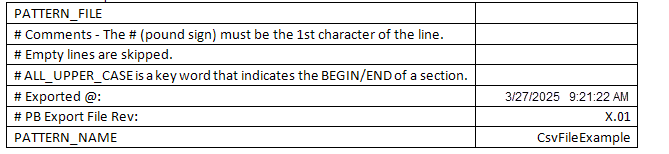
The CSV file must start with the PATTERN_FILE keyword and contain PATTERN_NAME, which is the name of the imported pattern. Additional comments may be added as needed and must begin with the symbol # as the first character in the row.
To preserve an existing pattern and import a new pattern, you may change the pattern name in the CSV file, or rename the existing pattern in Pulse Building. After the import, the pattern name from the CSV file is added to the list in the Patterns window.
Here is an example of a CSV file header:
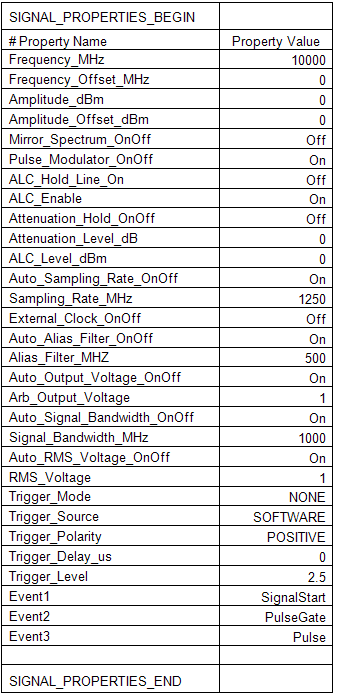
The first section following the file header is Signal Properties. It contains the signal properties located in the Pulse Building Pattern Library form in the Pattern Details area's Advanced view. The Signal Properties section must begin with the keyword SIGNAL_PROPERTIES_BEGIN and end with the keyword SIGNAL_PROPERTIES_END. The signal properties include the following:
|
Frequency_MHz |
Frequency_Offset_MHz |
Amplitude_dBm |
|
Amplitude_Offset_dBm |
Mirror_Spectrum_OnOff |
Pulse_Modulator_OnOff |
|
ALC_Hold_Line_OnOfff |
ALC_Enable |
Attenuation_Hold_OnOff |
|
Attenuation_Level_dB |
ALC_Level_dBm |
Auto_Sampling_Rate_OnOff |
|
Sampling_Rate_MHz |
External_Clock_OnOff |
Auto_Alias_Filter_OnOff |
|
Alias_Filter_MHz |
Auto_Output_Voltage_OnOff |
Arb_Output_Voltage |
|
Auto_Signal_Bandwidth_OnOff |
Signal_Bandwidth_MHz |
Auto_RMS_Voltage_OnOff |
|
RMS_Voltage |
Trigger_Mode |
Trigger_Source |
|
Trigger_Polarity |
Trigger_Delay_us |
Trigger_Level |
|
Event1 |
Event2 |
Event3 |
As shown in this example of a CSV file's Signal Properties section, the individually listed properties appear on separate lines between the keywords. The property names are listed in the first column and their associated values are listed in the next column. Property names must be labeled correctly.
Unless stated otherwise, all frequency values are in MHz, all time values are in micro-seconds, and all phase values are in degrees.
The second section following the file header is Pattern Header. It contains the order information for the pattern parameters. The parameter items are located in the parameter table area of the Pattern Library form's Pattern Details. The CSV file's Pattern Header section must begin with the keyword PATTERN_HEADER_BEGIN, and end with the keyword PATTERN_HEADER_END. The pattern header items include the following:
|
Index |
Object_Type |
|
Object_Name |
Off_Time_us |
|
Repeat |
Freq_Offset_MHz |
|
Power_Scale_dB |
Phase_Offset_Deg |
|
Pulse_Type |
Pulse_Rise_Time_us |
|
Pulse_Fall_Time_us |
Pulse_Width_us |
|
Pulse_Modulation_Type |
Pulse_Chirp_Peak_Deviation_MHz |
|
Pulse_Chirp_Direction |
Pulse_Barker_Code_Length |
|
Pulse_BPSK_QPSK_Step_Size_us |
|
|
PW_Pattern |
PW_Start_us |
|
PW_Stop_us |
PW_Number_of_Pulses |
|
PW_Step_us |
PW_Number_of_Steps |
|
PW_Pulses_Per_Step |
|
|
PW_Jitter |
PW_Jitter_Deviation_us |
|
PRI_Pattern |
PRI_Start_us |
|
PRI_Stop_us |
PRI_Burst_Interval_us |
|
PRI_Number_of_Pulses |
PRI_Step_us |
|
PRI_Number_of_Steps |
PRI_Pulses_Per_Step |
|
PRI_Staggered_Filename |
PRI_Jitter |
|
PRI_Jitter_Deviation_us |
|
|
PRI_Wobbulation_Deviation_us |
PRI_Wobbulation_Rate_MHz |
|
PRI_Wobbulation_Start_Time_Offset_us |
Antenna_Scan |
|
Antenna_Scan_Rate_RPM_Hz_Deg_per_s |
Antenna_Cone_Radius_Deg |
|
Antenna_Raster_or_Sector_Width_Deg |
Antenna_FlyBack_Time_us |
|
Antenna_Bar_Width_Deg |
Antenna_Number_of_Bars |
|
Antenna_Retrace_Time_us |
Antenna_Beam_On_During_Retrace |
|
Antenna_Custom_Filename |
Antenna_Custom_Interpolation |
|
Antenna_Azimuth_3dB_Beam_Width_Deg |
Antenna_Elevation_3dB_Beam_Width_Deg |
|
Antenna_Null_Depth_dB |
Antenna_Radiation_Type |
|
Antenna_Programmable_First_Sidelobe_Level_dB |
Antenna_Programmable_Sidelobe_Roll_Off_dB |
|
Antenna_Horizontal_Azimuth_Receiver_Location_Deg |
Antenna_Vertical_Elevation_Receiver_Location_Deg |
|
Hop_Pattern |
Hop_Start_MHz |
|
Hop_Stop_MHz |
Hop_Number_of_Pulses |
|
Hop_Step_MHz |
Hop_Number_of_Steps |
|
Hop_Pulses_Per_Step |
When you import an older CSV file, all the Hop pattern properties will be set to their default values. There is no effect on existing signals.
As shown in this example of a CSV file's partial Pattern Header section, the header items are listed in a single row between the keywords with one header per column.

The pattern header items are organized into five main groups. Each group contains sub-groups of related parameters as shown in the following figure. While you may reorganize the header items, Keysight recommends that you not do so, since the Export Pattern command uses the order shown here. If you eliminate pattern header items from an imported file, Pulse Building will use default values. See Pattern Items for details.
The following figure shows the five main group names in the CSV file. Each of these groups is described in the sections below.

Figure 1. Compressed view of the Pattern Header groups containing the CSV file's headings for the pattern item data.
The third section following the file header is Pattern Items. It contains the actual values used for the pattern header parameters. The CSV file's Pattern Items section must begin with the keyword PATTERN_ITEMS_BEGIN and end with the keyword PATTERN_ITEMS_END.
In a CSV file, the pattern item values are listed in rows between the keywords with each value located in the same column as its associated parameter in the pattern header row. One row of pattern items contains more than 50 values, which represent the data for one pulse in the pattern.
For details about the pattern header organization and their associated values, see Object, RF Offsets, Pulse Library Details, Hop Details Antenna Pattern Details, and PRI Details sections.
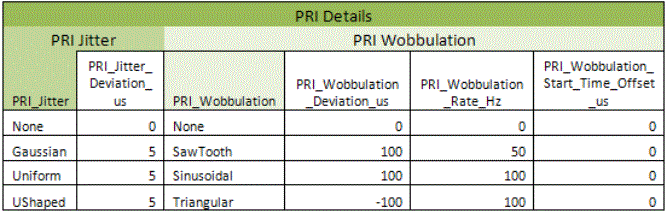
Individual entries for frequency values should be entered in MHz and time values should be entered in microseconds (us) unless specified otherwise by the Pattern Header item. Example: the value for PRI wobbulation rate is in Hz since its associated Pattern Header item is PRI_Wobbulation_Rate_Hz.
The Object group contains the following properties:
|
Object_Type |
|
Object_Name |
|
Off_Time_us |
|
Repeat |
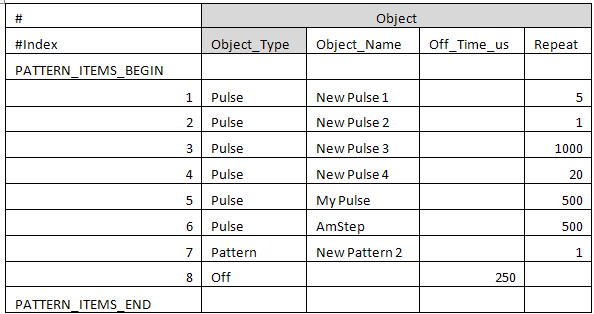
The Object properties are organized as shown in the Object example below appearing in the columns after the Index header. The properties in this section include the object type to generate, the object name, the off time in us, and the number of times to repeat the object. Valid objects include pulses, patterns, and off time. When the object type is off, all other values in the row are ignored except for the Off_Time_us, which is used for the off time length. If the object type is Pattern, an empty pattern is created unless a pattern with the specified name already exists in the Pattern Library.
The Index item is shown with the Object group since it is located in the first column immediately preceding the group. The index value is ignored. It is provided as a visual aid when creating pulse patterns in CSV files.
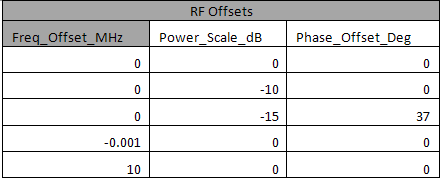
The RF Offsets group contains the following properties:
|
Freq_Offset_MHz |
|
Power_Scale_dB |
|
Phase_Offset_Deg |
The RF Offsets properties are organized as shown in RF Offsets example below. These properties are offsets that are applied to the RF output using I/Q modulation. The offsets include Frequency Offset, Phase Offset, and a Power Scale. The offsets for a given line are relative to objects in other lines as well as to the RF frequency and the RF amplitude. The offsets are applied to all objects specified by the number of repetitions. The offsets are additive, so if the Power Scale is set to -10 dB, and an antenna scan is applied to 1000 pulses, the amplitude for each pulse produced by the antenna patterns is reduced by 10 dB. With the Power Scale set to 0 dB, the maximum possible amplitude from the antenna pattern is 0 dB.
The Pulse Library Details group contains the following properties:
|
Pulse_Type |
Pulse_Rise_Time_us |
|
Pulse_Fall_Time_us |
Pulse_Width_us |
|
Pulse_Modulation_Type |
Pulse_Chirp_Peak_Deviation_MHz |
|
Pulse_Chirp_Direction |
Pulse_Barker_Code_Length |
|
Pulse_BPSK_QPSK_Step_Size_us |
|
|
PW_Pattern |
PW_Start_us |
|
PW_Stop_us |
PW_Number_of_Pulses |
|
PW_Step_us |
PW_Number_of_Steps |
|
PW_Pulses_Per_Step |
|
|
PW_Jitter |
PW_Jitter_Deviation_us |
The Pulse Library Details properties are organized into the following four subsections as shown in the CSV file examples in the sections below:
The pulse library details are ignored if the object type is Pattern or Off Time.
If the same pulse object is present on multiple lines in an imported CSV file, the last instance of the pulse is used to set the Pulse Library Details. If the pulse existed before a file is imported, the pulse property values are replaced with the values from the file's last instance of the pulse.
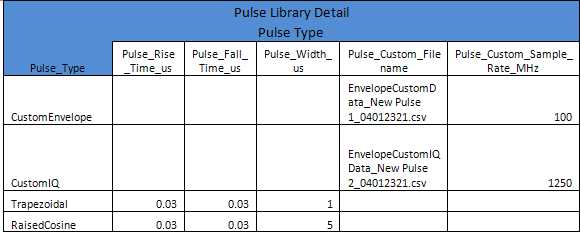
The properties shown in the Pulse Type example below specify the pulse edge type, or allows a custom pulse envelope or custom I/Q modulated pulse. When using the ramp or cosine edge, you may specify the rise time, fall time, and the pulse width. When using Custom Profile or Custom I/Q, you must specify a file that contains the appropriate data. You must also specify the sample rate used to generate the data. The default Pulse Type is Trapezoidal.
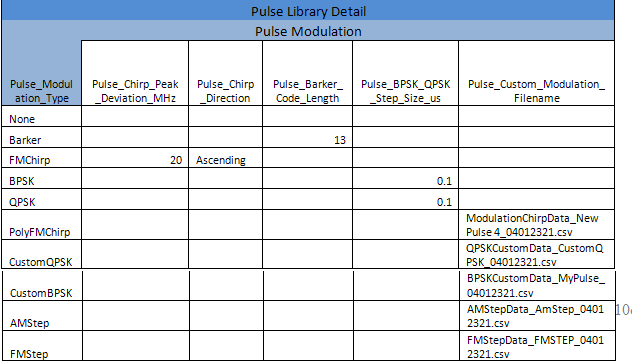
The properties shown in the Pulse Modulation example below set specific intra-pulse modulations. All pulse repetitions on a given line receive the same modulation. Many of the modulations require data from a separate file. See the specific file type for the file format. The default Pulse Modulation Type is none.
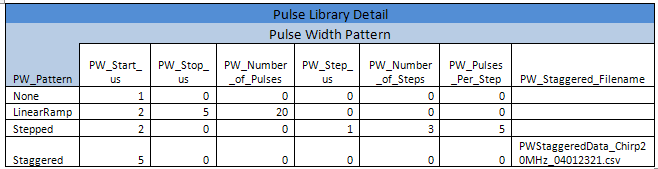
The properties shown in the Pulse Width Pattern example below enable you to vary the pulse width in random or specific ways. The pulse width pattern is only available when Pulse Type is Trapezoidal or Raised Cosine. The pulse width pattern can be combined with Pulse Width Jitter. The default Pulse Width Pattern is none.
The property PW_Number_of_Pulses defines the pattern; it does not indicate how many pulses will be generated. The Repeat property in the Object section sets the actual number of pulses generated.
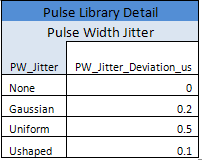
The properties shown in the Pulse Width Jitter example can be applied to both the Trapezoidal and Raised Cosine pulse types. Use the Repeat property in the Object section to specify how many pulses to generate with Pulse Width Jitter. If Repeat is set to 1, no width jitter will be observed. The default Pulse Width Jitter type is None.
The Hop Details group contains the following properties:
|
Hop_Pattern |
|
Hop_Start_MHz |
|
Hop_Stop_MHz |
|
Hop_Number_of_Pulses |
|
Hop_Step_MHz |
|
Hop_Number_of_Steps |
|
Hop_Pulses_Per_Step |
|
Hop_Staggered_Filename |
The Hop pattern properties enable you to vary the frequency hopping interval in deterministic ways. The Hop pattern can be applied to either a pulse object type or a pattern object type. The Hop Start value maps to or from the first item in the Staggered Hop list. The default value for Hop Pattern Type is None.
The property Hop_Number_of_Pulses defines the pattern; it does not indicate how many pulses will be generated. The Repeat property in the Object section sets the actual number of pulses generated.
The Antenna Pattern group contains the following properties:
|
Antenna_Scan |
Antenna_Scan_Rate_RPM_Hz_Deg_per_s |
|
Antenna_Cone_Radius_Deg |
Antenna_Raster_or_Sector_Width_Deg |
|
Antenna_FlyBack_Time_us |
Antenna_Bar_Width_Deg |
|
Antenna_Number_of_Bars |
Antenna_Retrace_Time_us |
|
Antenna_Beam_On_During_Retrace |
Antenna_Custom_Filename |
|
Antenna_Custom_Interpolation |
Antenna_Azimuth_3dB_Beam_Width_Deg |
|
Antenna_Elevation_3dB_Beam_Width_Deg |
Antenna_Null_Depth_dB |
|
Antenna_Radiation_Type |
Antenna_Programmable_First_Sidelobe_Level_dB |
|
Antenna_Programmable_Sidelobe_Roll_Off_dB |
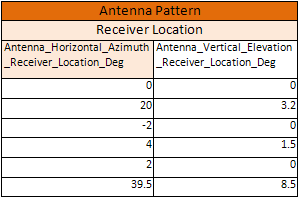
Antenna_Horizontal_Azimuth_Receiver_Location_Deg |
|
Antenna_Vertical_Elevation_Receiver_Location_Deg |
|
The Antenna Pattern properties are organized into the following four subsections (also shown in the CSV file examples below).
Antenna Scan
Beam Width
Radiation Pattern
Receiver Location
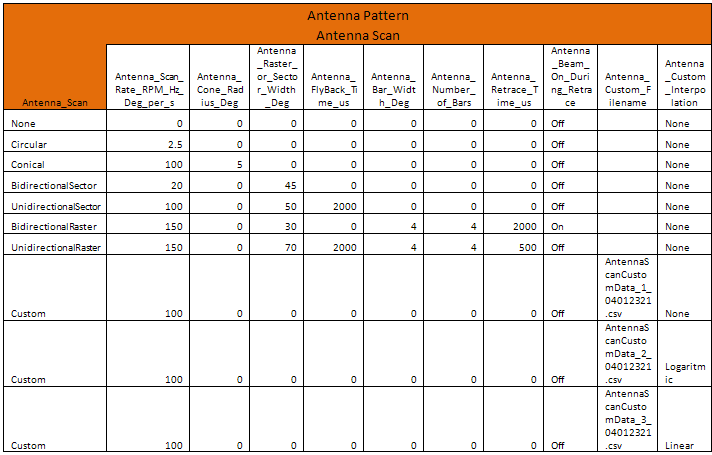
The properties shown in the Antenna Scan example below enable you to specify the type of antenna scan to use. The default antenna scan is None.
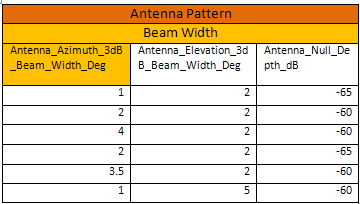
The properties shown in the antenna Beam Width example enable you to specify the horizontal and vertical 3 dB beam width. Additionally, you may specify the minimum amplitude level that the antenna scan can reach. The absolute minimum amplitude level the antenna scan can reach is hardware dependent.
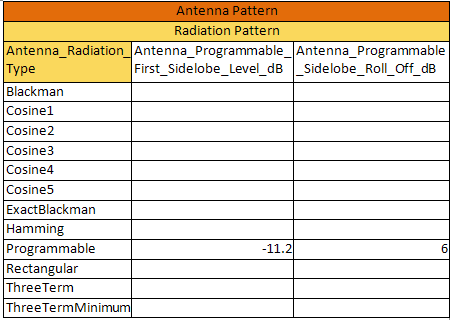
The properties shown in the Radiation Pattern example are required for the first side lobe and the roll off properties only when you select Programmable radiation type. The default radiation pattern is rectangular.
The properties shown in the Receiver Location example set the receiver location relative to the main antenna beam at the start of the scan. Negative values for the horizontal or vertical receiver location mean that the receiver is never directly crossed by the main beam.
The PRI Details group contains the following properties:
|
PRI_Pattern |
PRI_Start_us |
|
PRI_Stop_us |
PRI_Burst_Interval_us |
|
PRI_Number_of_Pulses |
PRI_Step_us |
|
PRI_Number_of_Steps |
PRI_Pulses_Per_Step |
|
PRI_Staggered_Filename |
PRI_Jitter |
|
PRI_Jitter_Deviation_us |
PRI_Wobbulation |
|
PRI_Wobbulation_Deviation_us |
PRI_Wobbulation_Rate_MHz |
|
PRI_Wobbulation_Start_Time_Offset_us |
|
The PRI Details properties are organized into three subsections:
PRI Pattern
PRI Jitter
These subsections are shown in the CSV file example screens below. The PRI pattern properties enable you to vary the signal repetition interval in both random and deterministic ways. The PRI pattern can be applied to either a pulse object type or a pattern object type. The PRI Start value maps to or from the Repetition Interval property and to the first item in the Staggered PRI list. The default value for PRI Pattern Type is None.
The property PRI_Number_of_Pulses defines the pattern; it does not indicate how many pulses will be generated. The Repeat property in the Object section sets the actual number of pulses generated.
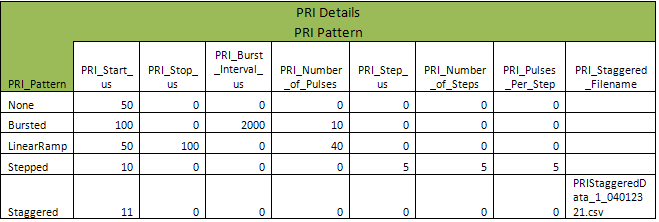
The PRI pattern can be combined with PRI Jitter and PRI Wobbulation. The PRI Wobbulation Rate is imported and exported in Hz. The default value for PRI Jitter and PRI Wobbulation is none.